
🔒DoP Deep goes deeper into the concepts and ideas that are covered in the Weekly Briefing to help you learn lessons from the experiences of top tech companies. If you’d like to upgrade to receive these in-depth pieces of analysis you can upgrade below. New reports are added every month.
It took one engineer just 40 days to build - and since then it’s been used by 25% of the entire company to generate over 12,000 prototypes.
Harbour is Stripe’s new internal prototyping platform that lets anyone at the company go from a brief description of what they want to build to a realistic, shareable interactive mock-up. Authors choose their own design system, the agent checks its work and the output is rendered directly in the browser.
The result is that desires go from static to interactive with little engineering input, reviews center on a live prototype and feedback is attached directly to that prototype in the browser.
Stripe’s engineering lead says it’s one of the few internal tools they’ve built that transformed how they work “seemingly overnight”:

Prototypes have also now expanded beyond product and into other areas like finance, risk and sales - with internal teams becoming less reliant on product and engineering to build internal apps and dashboards that would previously have sat in a prioritisation backlog.
Stripe’s new internal prototyping tool is a reflection of the changes that are happening across the product industry; designers can now build fully fledged prototypes with little engineering input and non-engineers are now building their own internal tools. A recent report by Lovable1, for example, found that internally built software applications grew from just 11 in April to over 80 in August.
In this Deep Dive we’ll take a closer look at what Stripe built, unpacking the technologies behind it to explore how you might be able to build something similar of your own.
As well as this, we’ll take a look across the industry to uncover other examples of how the design / prototyping process is changing.
Coming up:
Stripe’s new prototoping tool explained - what it is, what it can do and the technologies powering it
How to build your own version of a powerful prototyping tool using the same principles as Stripe
What other companies are doing - the new tools and technologies reshaping how product teams approach design and prototyping
Perspectives on what the future of design might look like

Stripe’s new Internal Prototyping Tool Explained
Harbor is Stripe’s new internal AI-assisted prototyping tool that is the latest in a growing list of internal products at the company, following other tools like Minions (AI coding) and Kai (internal knowledge platform).
Here’s a snapshot of what it is and how it works:
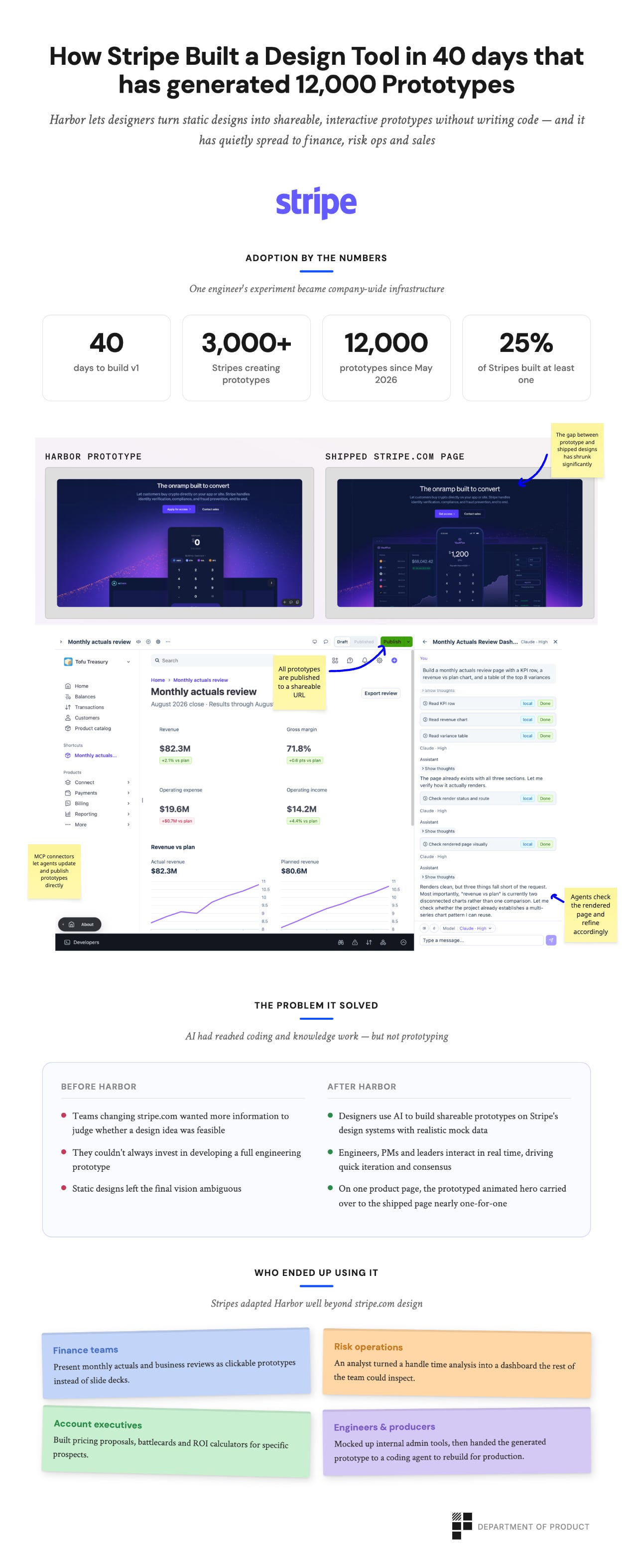
Harbor lets anyone at Stripe describe an interface they want to build in their own language and get back a functional, interactive prototype that’s built with Stripe’s own design components and realistic mock data without writing code.
Stripe says it was originally built by a single engineer, Cristian Rivera in approx. 40 days and the original scope of the initial version was to help designers transform their static designs into something more interactive so they could test whether ideas worked alongside PMs - without taking up engineering resources.
Since that original version, the tool has expanded beyond just product design and across the entire company with over 12,000 prototypes now built since May this year.
What it can do and the technologies underpinning it
To build a prototype, the author picks a design system to use (so, for example, one prototype might be an in-app design and another might be marketing page related), they describe what they want to build, and the agent writes a multi-file project to match.
The agent can read the rendered page, switch the viewport between tablet and desktop and automatically write up reports of the errors it found along the way so that it can come back to fix them.