
Agent Driven User Interfaces Explained
🧠 A2UI: A closer look at Google’s new Agent-driven UI framework that could transform the future of product design. Knowledge Series #97
🔒The Knowledge Series is available for paid subscribers. Get full ongoing access to 90+ technical explainers and AI guide and tutorials to grow your technical knowledge at work. Multiple new guides are added every month.
Google’s former CEO Eric Schmidt has predicted that in the future, user interfaces as we know them “are going to go away”. In his view, as users increasingly express their intent conversationally, where UIs are needed, they will instead be generated on the fly and personalized to that user.
This still sounds a little far-fetched but a few weeks ago, Google quietly released a fascinating new technology called A2UI that takes us one step towards this future.
It hasn’t been gaining much attention just yet but Google says it has already started using the technology across its portfolio of products including Opal, the mini‑app platform where “AI mini-apps” expose rich, task‑specific interfaces entirely driven by A2UI messages, and other products in its portfolio.
Here’s an example of the kinds of interfaces that can be generated by A2UI:
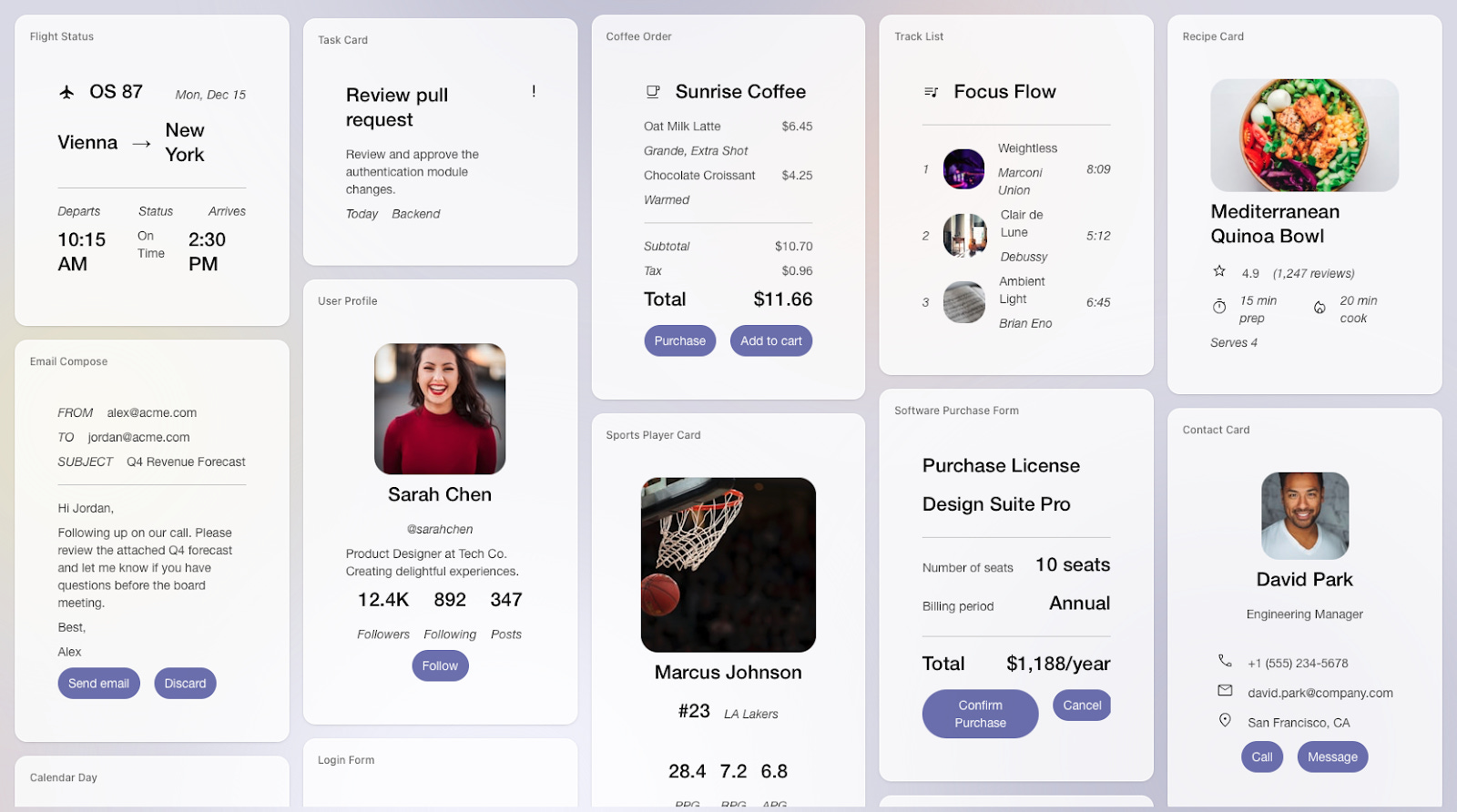
We’re not there yet, but Google is already rolling this out across many of its products and if Schmidt’s prediction does ultimately play out, dynamic agent-driven UIs, personalized to each user, could become the default way that many users interact with software.
In this Knowledge Series, we’re going to unpack the essentials of A2UI that product teams need to know including the core technical pieces that power the technology, real world examples in action plus how you can get some hands on experience with A2UI to get up to speed quickly.
Coming up:
What exactly is A2UI? - the core pieces of A2UI broken down and explained in simple terms
How Google is using it in their own products: real world examples of it in action
What product / tech leaders are saying about A2UI: perspectives and opinions from tech leaders at Google, Storybook and beyond
Practical insights and implications for product teams: what this means for your design system, engineering process and strategy
How you can experiment with it. Get hands on with a free, helpful tool that lets you generate some UI on the fly components using A2UI to get up to speed quickly

What exactly is A2UI?
Here’s a snapshot of what A2UI is and how it works:
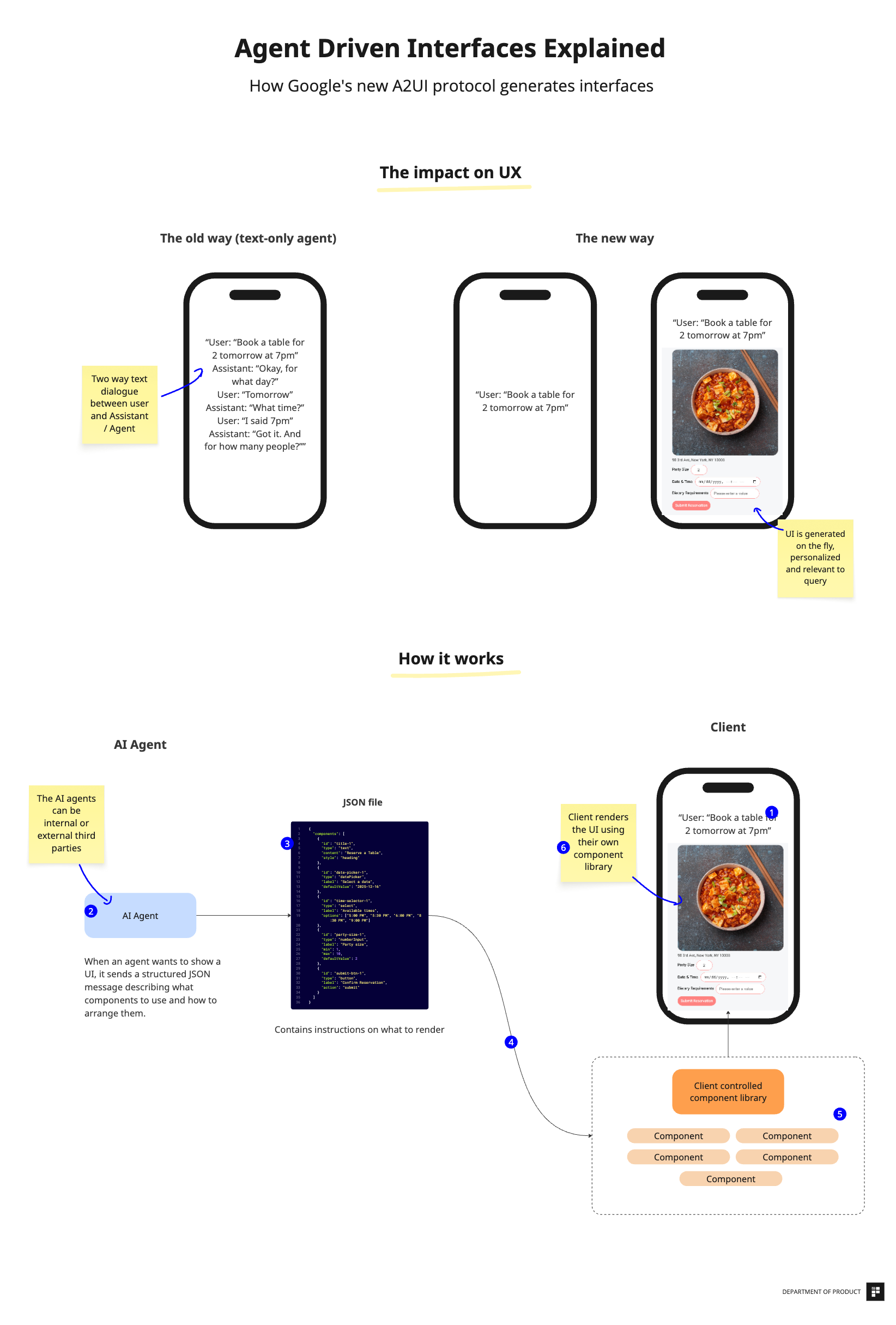
To help explain how this works, the diagram is broken down into 2 different sections: first, the impact on the user experience and second, how it works.
1. The impact on the UX
As you can see from this basic example, the introduction of the A2UI protocol means that for the user, an interaction will start conversationally but at some point, the Agent will decide that this specific use case is better suited to a clickable, interactive interface.
A text only agent would involve a series of back and forth conversations while a product built with A2UI would understand when and how to generate a UI on the fly to make the UX easier for the user to achieve their goal:
Text only agent
User: “Book a table for 4 tomorrow at 5pm”
Your app’s AI: “Okay, for what day?”
User: “Tomorrow”
Your app’s AI: “What time?”
User: “I said 5pm”
Your app’s AI: “Got it. And for how many people?”
With A2UI:
User: “Book a table for 4 tomorrow at 5pm”In this case, your app’s AI: generates a booking form with date picker, time selector, party size field, and a submit button - all pre-filled based on the request.
The examples visualized both focus on mobile devices but the A2UI protocol will work on desktop, too. Users can stay within their chat interface and switch from conversational interfaces to more traditional interactive UIs that are dynamically generated on demand. These interfaces will be styled using the host app’s design components - more on that below.
How it works: a step by step breakdown of the technologies involved plus tools you can use
The second part of the diagram shows how this technology works and if you look closely, you’ll see this is annotated with numbers to help understand each part of the A2UI workflow.
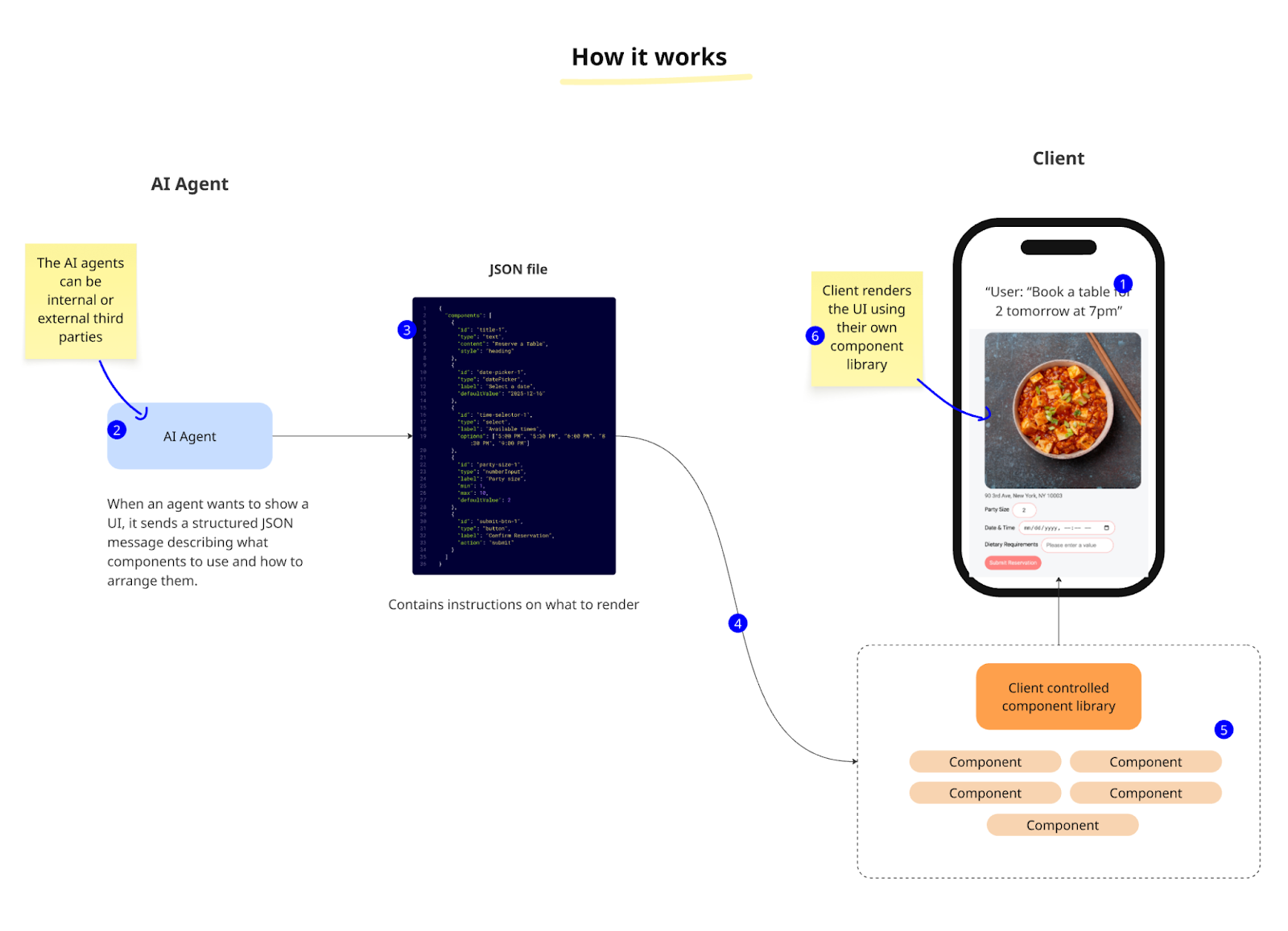
Let’s break down each part of the workflow to get a better understanding. Once we’ve gotten an understanding of how the various technical pieces work, we’ll then get some hands on experience using A2UI to generate some components of our own.