
How to Simulate Important Meetings before they happen in 1 click with Claude Code
🧠 Prepare for difficult meetings with your own simulation tool. Choose your participants, set the agenda and hit the simulation button. Knowledge Series #104
🔒 The Knowledge Series breaks down emerging AI technologies with practical playbooks designed specifically for product teams. Get 100+ guides and practical tutorials covering everything from Claude Code and MCP to agentic workflows, vibe coding, and more.
The idea of running meeting simulations to help prepare for a meeting before it happens would have sounded outlandish even just a few years ago, but simulations at work are becoming increasingly popular.
AWS has confirmed that it has its own meeting simulation tool to help its employees prepare for important meetings and many new user research tools now offer an option to run simulations of user research at scale to validate ideas quickly.
The use cases for product teams are powerful: the stakeholder who can’t commit to the roadmap, the executive who keeps deferring the decision you need made, the skeptical CTO who doesn’t agree with the approach to building a new mobile app. These are the types of meetings that keep PMs up the night before - and they’re the ones that are often worth rehearsing.
A meeting simulator lets you do that. You feed it your agenda, your attendees, and the context that matters, and it runs a simulated version of the meeting before the real one happens. It’s definitely not a perfect prediction, but it is a powerful way to surface objections you hadn’t prepared for, perspectives you hadn’t considered, and arguments you thought were airtight but aren’t.
In this Knowledge Series, we’re going to take a look at how you can build your own meeting simulation tool with Claude Code. It will use your product’s context and meeting attendees to run a simulated meeting in 1 click and let you incorporate this into your workflows.
Coming up:
A step by step guide on how to build your own Meeting Simulator tool
Meeting simulation templates you can use for meetings including: Deciding which technology to use for a mobile app, getting sign-off on a decision when the decision-maker keeps deferring and convincing a skeptical senior stakeholder
How to transform your Meeting Simulator app into a system that can connect to your Calendar and proactively run simulations automatically

Here’s a demo of the finished Meeting Simulator we’ll build together
The meeting simulation tool lets product team members choose the people who will be attending the meeting, set the agenda and provide additional context by connecting to any relevant artifacts like presentation decks or data sources.
The simulation will then run, highlighting any key moments from it and provide you with some insights that you can then incorporate into your materials that you’d already prepared - or generate new ones altogether.
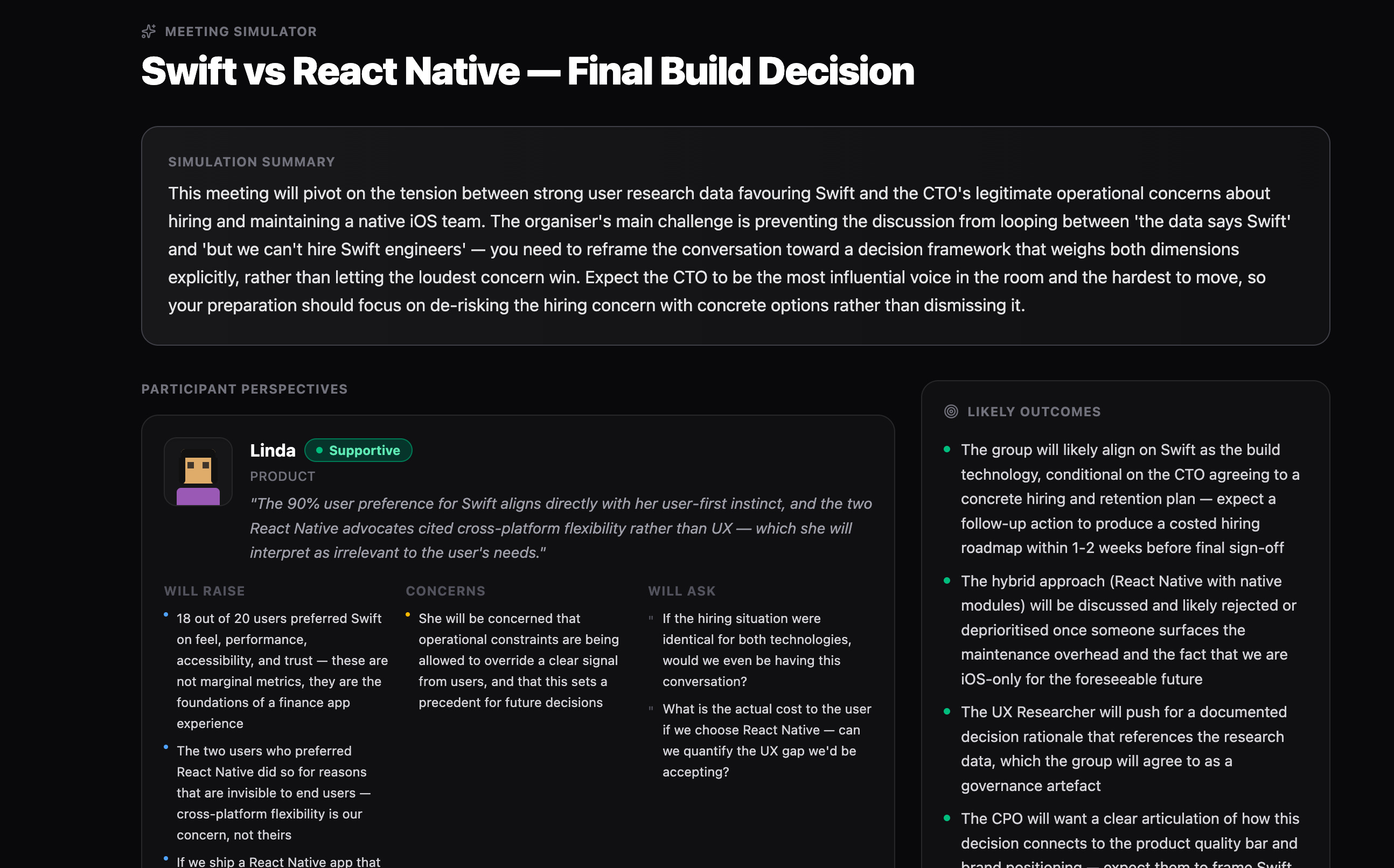
So this is what we’re going to build together. This meeting simulator is designed to help you to prepare for real world meetings by creating a simulation of the meeting ahead of time.
Roles included
The simulator includes over 48 different roles that you can add to your meeting simulator, tailored specifically for product teams, as well as custom roles you can create yourself. The pre-built roles include:
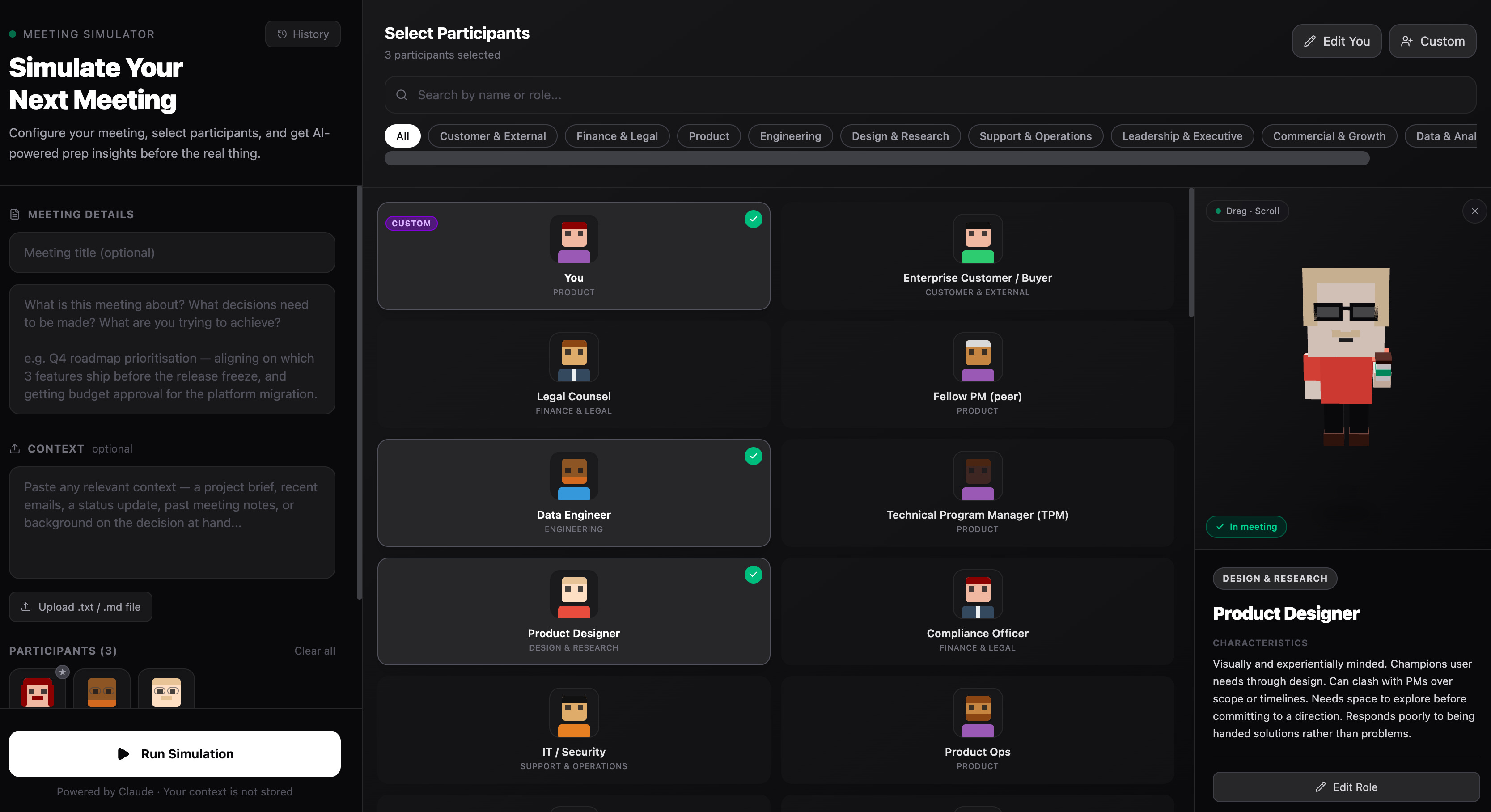
Fellow PM (peer) - mirror and sparring partner
Head of Product / CPO - sets vision, holds roadmap bar Engineering
Backend Engineer - pragmatic, focused on scalability and APIs
Product Designer - champions user experience
UX Researcher - evidence-driven, challenges assumptions
CEO / Founder - visionary but impatient, HiPPO-style pressure
CTO - thinks in systems, sceptical of technical debt
Chief of Staff - keeps the org aligned, surfaces blockers Commercial & Growth
Sales Representative - quota-driven, brings customer feedback
Customer Success Manager - retention-focused, surfaces churn risk
Legal Counsel - risk-averse, focused on liability
Compliance Officer - methodical, regulation-driven
CFO / VP Finance - focused on ROI and cost control Customer & External
External Consultant - opinionated, pattern-matches from other orgs
Vendor / Supplier - selling, not always aligned with your goals