
How to use Perplexity’s new Computer to build a Pricing Intelligence Engine, OKR review system, API cost simulator and more
🧠 What is Perplexity Computer and how can product teams use it at work? Core concepts explained with practical, real world applications.
🔒 The Knowledge Series breaks down emerging tools like Perplexity Computer into practical playbooks you can actually use - with real prompts, end-to-end workflows, and ready-to-deploy examples. Stay ahead of the AI curve with 100+ guides covering everything from agentic workflows and Claude Code to MCP, vibe coding, and more.
Following the launch of Perplexity’s new Computer tool, the company recently shot back up into Ramp’s top 10 list of the fastest growing SaaS companies in the world.
For a while, it looked as though Perplexity was at risk of fading into irrelevance after Google’s AI Mode continued to improve and the buzz around AI browsers died off, it was starting to feel as though Perplexity was set to become one of the first major casualties of the AI race.
But Perplexity Computer seems to have given the company a new lease of life as it leans heavily on the company’s core differentiator: its ability to leverage multiple different models depending on the output you need, as well as the latest agentic and coding capabilities that make it possible to actually build valuable tools and artifacts.
It’s not entirely clear how defensible this moat is long-term as the likes of Google build out powerful new multi-modal capabilities, but for now at least, it looks as though Perplexity is back. And for product teams, Perplexity Computer can be a powerful addition to your AI work stack.
In this Knowledge Series, we’ll explore what Perplexity Computer is, how it works under the hood and most importantly, how you can use it at work.
We’ll take a look at different potential use cases for product teams including building an always-on system that monitors converts action items from meetings into Linear tickets, a competitor intelligence dashboard that monitors new releases and pricing changes from competitors, an CMS powered by Google Docs and more.
Coming up:
What is Perplexity Computer and how does it work?
A step by step example of how you might use it for creating AI Agent market analysis
Practical things product teams can build with Perplexity Computer:
Pricing / Feature Intelligence Dashboard – monitors competitor pricing, features, launches, and emails alerts.
Meeting‑to‑Ticket Converter – turns product meetings into Linear or Jira tickets and chases overdue ones.
Quarterly OKR Kickoff Deck – drafts OKR decks each quarter from strategy docs, last results, backlog.
API Cost Simulator – models future API/vendor costs from your logs and current pricing to spot “cliff edges.”
What other people are building with Perplexity Computer: a curated selection of other apps built with Computer you can use as inspiration including code base visualizers, marketing campaign monitors and more

What exactly is Perplexity Computer?
Perplexity Computer is a general purpose AI “digital worker” that was unveiled by Perplexity earlier this year. Rather than just answering questions or completing single tasks, it creates and executes entire workflows, capable of running for hours or even months.
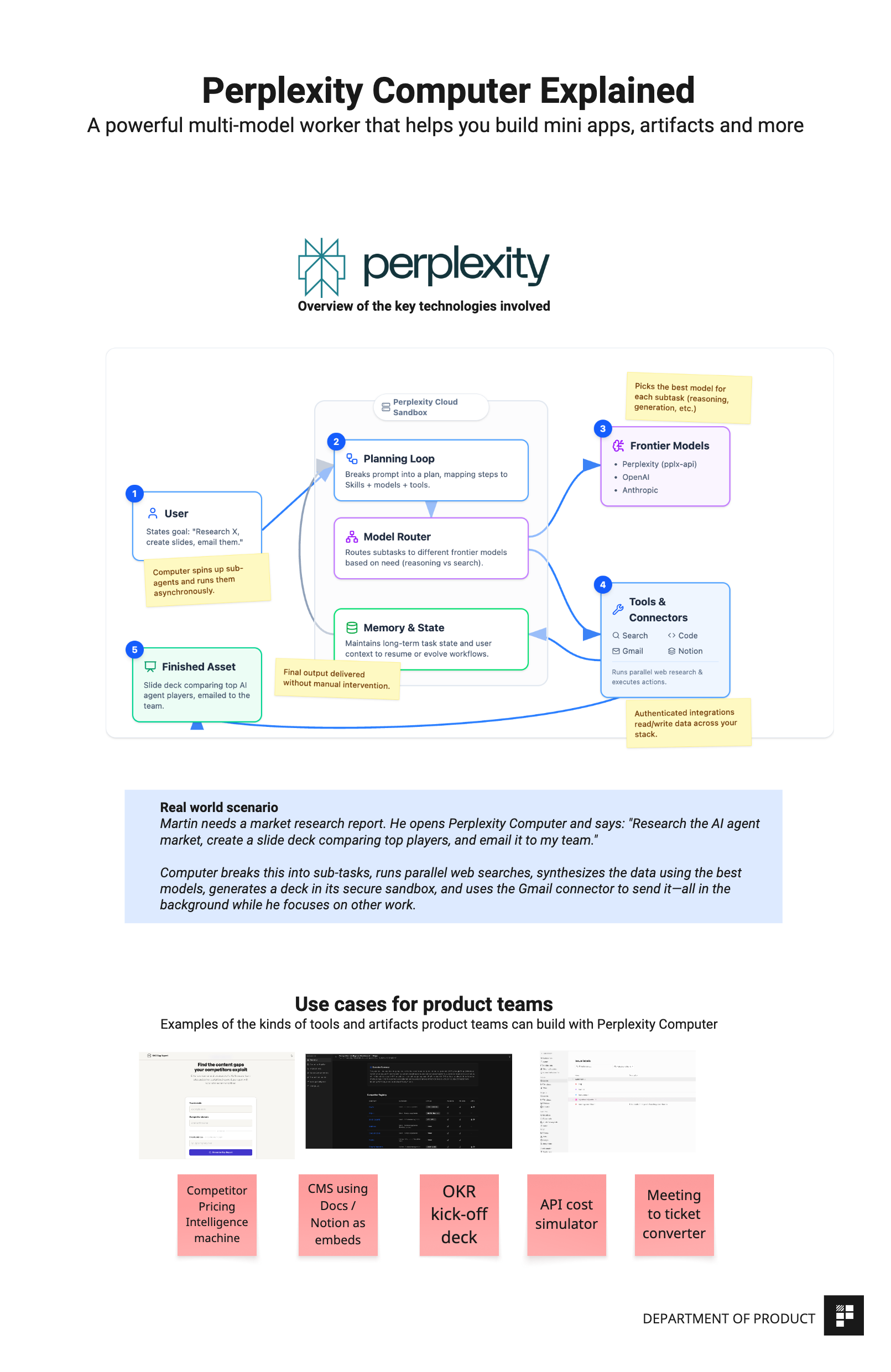
The core idea is that you start by describing an outcome and Computer breaks it into tasks and subtasks, creating sub-agents for execution. Those sub-agents might do web research, document generation, data processing, or API calls to connected services - with coordination happening automatically and asynchronously.
The original version of Computer runs entirely in the cloud but last week, the company also announced an updated future version that will allow users to run it on a local machine too.
Why is it powerful?
Perplexity’s key differentiator is its multi-model orchestration.
Rather than relying on a single model, it routes subtasks to whichever frontier model it thinks is best suited: so, for example, it might choose Opus 4.6 for core reasoning, Grok for lightweight speed tasks, and ChatGPT 5.2 for long-context recall, among others.
It also integrates deeply with your existing tools. Connectors like Gmail, Outlook, GitHub, Linear, Slack, Notion, Salesforce, and Snowflake let it read and write data and take actions across your stack.
Practical, hands-on ideas for building apps and assets with Computer - prompts and templates included
Now let’s take a look at some of the ways you can use Perplexity Computer at work. To set the context, here’s a step-by-step example to bring each of the core concepts we discussed to life: